Day_6 #7
Assignees
 8a12744 (黄竣淘)
 Canavias (王俊泽)
 Ctwo
Ctwo
 Eliana
 InkyUmbrella (Li ChunYu)
 Jehyn (姬艺华)
 Killua753 (廖世嘉)
 LingTaiOwO
 SOR2171 (曹克铭)
 ShionKanagawa (Shion)
 Wentao (杜文韬)
 XW1nDX (郭一凡)
 YuiCtwo (Ctwo)
 aurorazxt
 bhr123
 dx2331lxz (DaoXuan)
 icy_amire (张艺严)
 itstudio
 litlighilit (lit)
 luojie
 nyaco
nyaco
 pjc
pjc
 pjh123 (彭俊皓)
 ryansanchez7115 (刁泓宁)
 shimmer (何禹颃)
 slnmx (十里柠檬仙-lhr)
 szhszh0305 (宋志恒)
 wkylnj (kaiyu wang)
 xander
 yaosanqi137 (古宇恒)
 yawangjiang
Clear assignees
8a12744 (黄竣淘)
Canavias (王俊泽)
Ctwo
Eliana
InkyUmbrella (Li ChunYu)
Jehyn (姬艺华)
Killua753 (廖世嘉)
LingTaiOwO
SOR2171 (曹克铭)
ShionKanagawa (Shion)
Wentao (杜文韬)
XW1nDX (郭一凡)
YuiCtwo (Ctwo)
aurorazxt
bhr123
dx2331lxz (DaoXuan)
icy_amire (张艺严)
itstudio
litlighilit (lit)
luojie
nyaco
pjc
pjh123 (彭俊皓)
ryansanchez7115 (刁泓宁)
shimmer (何禹颃)
slnmx (十里柠檬仙-lhr)
szhszh0305 (宋志恒)
wkylnj (kaiyu wang)
xander
yaosanqi137 (古宇恒)
yawangjiang
No Assignees


Notifications
Due Date
No due date set.
Dependencies
No dependencies set.
Reference: ITStudio_OUC/DailyChallenge_WebDepartment#7
Reference in New Issue
Block a user
Delete Branch "%!s()"
Deleting a branch is permanent. Although the deleted branch may continue to exist for a short time before it actually gets removed, it CANNOT be undone in most cases. Continue?
AI页面说明
1. 导航栏是怎么两端对齐的?
导航栏父容器用了
display: flex,让 Logo 和菜单排成一行。关键属性是
justify-content: space-between,它把第一个子元素(Logo)推到最左边,最后一个子元素(菜单)推到最右边,实现两端对齐。同时用
align-items: center让 Logo 和菜单在垂直方向居中。用到的选择器:
.navbar。用到的属性:
display: flex、justify-content: space-between、align-items: center。2. 卡片区是用什么布局排成一行的?
卡片容器用了
display: flex和flex-wrap: wrap,默认横向排列,空间不够时自动换行。每张卡片设置
flex: 1 1 250px,表示可以放大、可以缩小,基础宽度 250px,这样三张卡片能平分一行。卡片之间用
gap: 20px拉开间距。媒体查询
@media (min-width: 768px)里把flex-wrap改成nowrap,屏幕 ≥768px 时强制不换行,三张卡片就在同一行等分宽度。用到的选择器:
.card-container、.card、@media。用到的属性:
display: flex、flex-wrap、gap、flex、@media (min-width: 768px)。3. 还有哪些 CSS 知识点在起作用?
box-sizing: border-box:让 padding 和 border 算在宽度内,布局更可控。border-radius:卡片圆角。box-shadow:卡片阴影,增加层次感。text-decoration: none:去掉链接下划线。总结
这个页面主要用 Flexbox 完成导航栏和卡片区布局,配合媒体查询做响应式。导航栏靠
space-between两端对齐,卡片区靠flex和flex-wrap自动排列,宽屏时通过nowrap保持一行。profile.html:
加了 viewport,媒体查询能切换布局
<html lang="zh"> <head> <style> .cards { display: flex; flex-direction: column; gap: 20px; } .card { border: 1px solid #000; padding: 20px; display: flex; border-radius: 8px; } @media (min-width: 768px) { .cards{ justify-content: space-between; </head>看懂了ai写的页面
1导航栏是怎么两端对齐的?
用display: flex justify-content: space-between;两端对齐
2卡片区是用什么布局排成一行的?
媒体里面用flex-direction: row; 保证长度足够时按行排列
3AI 页面里至少 3 处用到的 CSS 知识点:
box-shadow 给容器设置阴影,更真实好看。
transition:让动画变化有过度更平滑
object-fit:设置图片在容器中怎么填充
两端对齐通过display: flex; 和justify-content: space-between;实现。
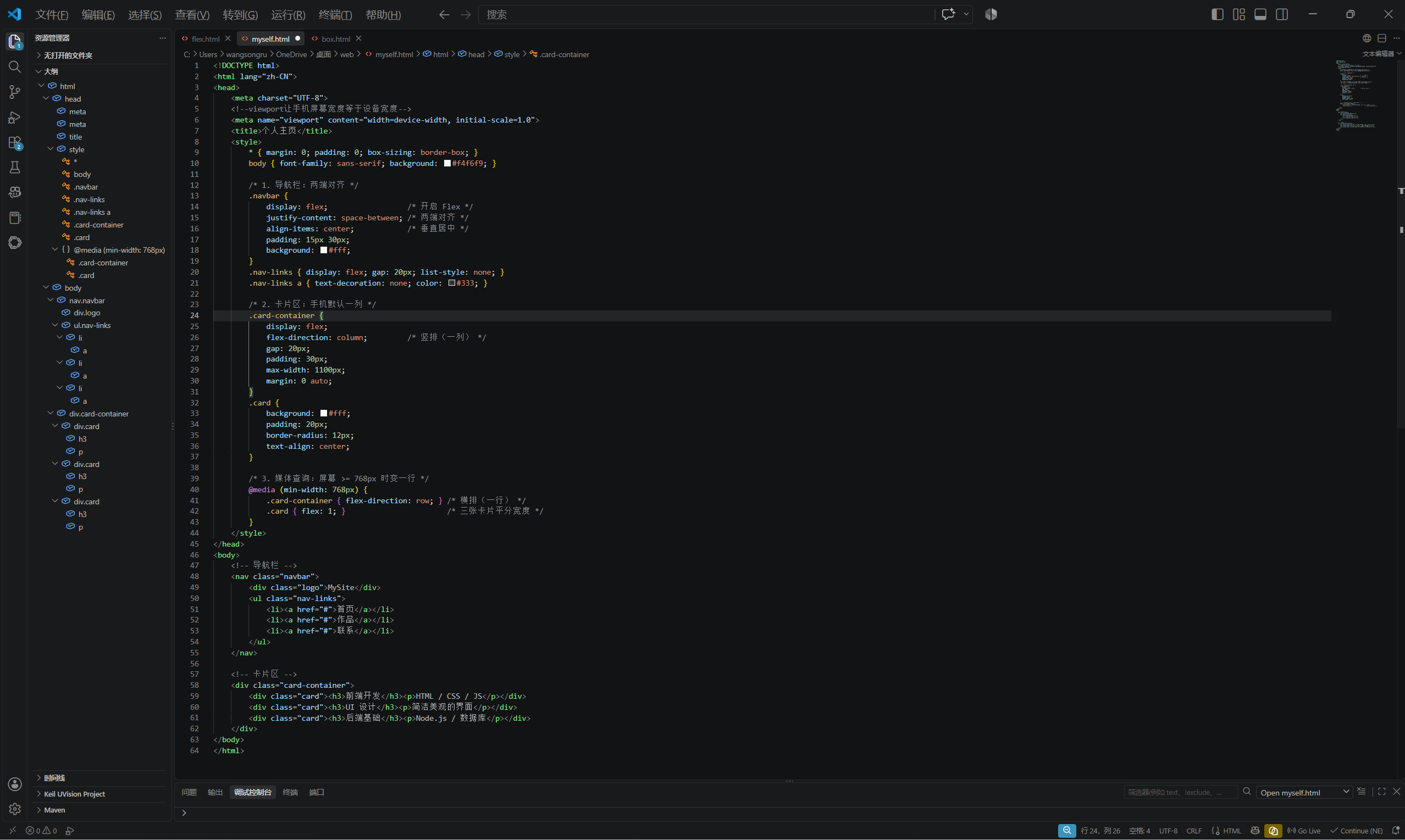
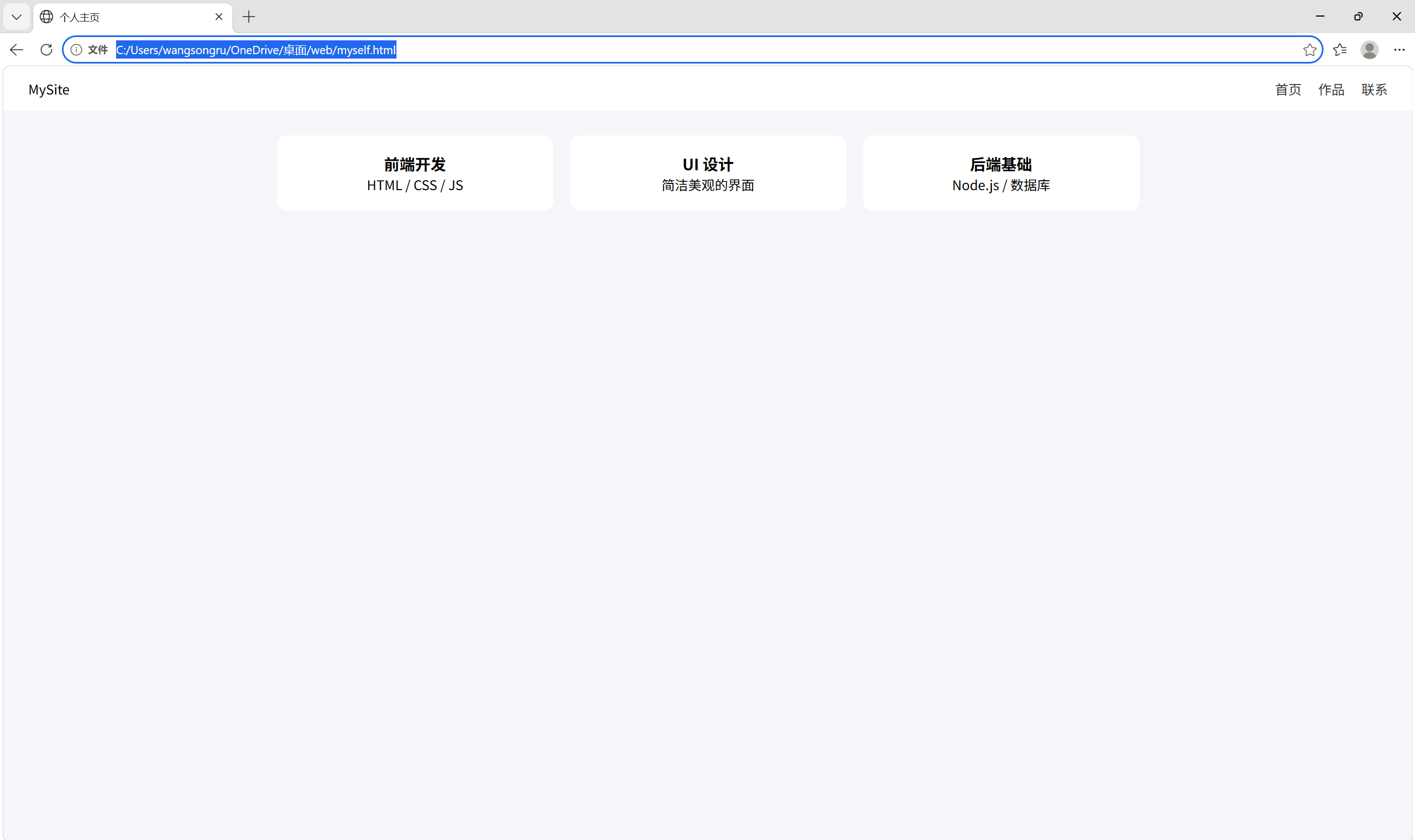
排成一行默认用 flex-direction: column;排成一列,当屏幕宽度 ≥ 768px 时,用@media把它改成 flex-direction: row;排成一行
类选择器.navbar、.card-container
属性display: flex:开启弹性布局。justify-content: space-between:两端对齐。flex-direction:控制横排还是竖排。@media (min-width: 768px):媒体查询,屏幕够宽时才应用横排规则。viewport meta:让手机屏幕按真实宽度显示,媒体查询才准确。
都懂了
`<!doctype html>
<html lang="zh-CN"> <head> <style> * { margin: 0; padding: 0; box-sizing: border-box; } /* 导航栏 */ nav { background: #222; color: white; padding: 16px 24px; /* flex实现两端对齐 */ display: flex; justify-content: space-between; align-items: center; } .nav-links a { color: #fff; text-decoration: none; margin-left: 16px; } </head>