Day_5 #6

Open
opened 2026-09-11 18:27:50 +08:00 by pjc · 7 comments
Owner
No description provided.

个方块能排成一行并均匀分布
能做出水平垂直居中
能说出 justify-content 和 align-items 分别管什么

<html lang="zh"> <head> <style> .row {
     display: flex;
    justify-content: space-between;
    gap: 20px;
    background-color: #eee;
    padding: 10px;


  }
    .box {
        background-color: steelblue;
        color: white;
        padding: 20px;}
   .center {
    display: flex;
    justify-content: center;
    align-items: center;
    height: 200px;
    background-color: #ddd;
    margin-top: 20px;
  }
  
    </style>
</head>
<body>
     <div class="row">
  <div class="box">我来</div>
  <div class="box">我也来</div>
  <div class="box">我还来</div>
</div>
<div class="center">
  <div class="box">我在你后面</div>
</div>

</body>
</html>
个方块能排成一行并均匀分布 能做出水平垂直居中 能说出 justify-content 和 align-items 分别管什么 <!DOCTYPE HTML> <html lang="zh"> <head> <meta charset="UTF-8"> <title >很弹的盒子</title> <link rel="stylesheet" href="box.css"> <style> .row { display: flex; justify-content: space-between; gap: 20px; background-color: #eee; padding: 10px; } .box { background-color: steelblue; color: white; padding: 20px;} .center { display: flex; justify-content: center; align-items: center; height: 200px; background-color: #ddd; margin-top: 20px; } </style> </head> <body> <div class="row"> <div class="box">我来</div> <div class="box">我也来</div> <div class="box">我还来</div> </div> <div class="center"> <div class="box">我在你后面</div> </div> </body> </html>
  • 3 个方块能排成一行并均匀分布
  • 能做出水平垂直居中
  • 能说出 justify-content 和 align-items 分别管什么

flex.html:

<!doctype html>
<html lang="zh">
  <head>
    <meta charset="UTF-8" />
    <title>Flex 布局练习</title>
    <style>
      .container{
          display:flex;
          justify-content: space-between;
          gap:20px;
          border: 2px dashed #ccc;
          padding:20px;
          margin-bottom: 40px;
      }

      .box{
          width: 80px;
          height: 80px;
          background-color: lightblue;
          display: flex;
          justify-content: center;
          align-items: center;
          font-size: 24px;
          color: white;
          font-weight: bold;
      }
      .box:nth-child(1) { background-color: #e74c3c; }
      .box:nth-child(2) { background-color: #2ecc71; }
      .box:nth-child(3) { background-color: #3498db; }

      .center-container {
          display: flex;
          justify-content: center;
          align-items: center;
          height: 300px;
          border: 2px dashed #ccc;
      }

      .center-box {
          width: 100px;
          height: 100px;
          background-color: #f39c12;
          color: white;
          display: flex;
          justify-content: center;
          align-items: center;
          border-radius: 10px;
      }
    </style>
  </head>
  <body>
    <h1>1. space-between + gap</h1>
    <div class="container">
      <div class="box">1</div>
      <div class="box">2</div>
      <div class="box">3</div>
    </div>

    <h1>2. 水平垂直居中</h1>
    <div class="center-container">
      <div class="center-box">居中</div>
    </div>
  </body>
</html>
- [x] 3 个方块能排成一行并均匀分布 - [x] 能做出水平垂直居中 - [x] 能说出 justify-content 和 align-items 分别管什么 **flex.html:** ```html <!doctype html> <html lang="zh"> <head> <meta charset="UTF-8" /> <title>Flex 布局练习</title> <style> .container{ display:flex; justify-content: space-between; gap:20px; border: 2px dashed #ccc; padding:20px; margin-bottom: 40px; } .box{ width: 80px; height: 80px; background-color: lightblue; display: flex; justify-content: center; align-items: center; font-size: 24px; color: white; font-weight: bold; } .box:nth-child(1) { background-color: #e74c3c; } .box:nth-child(2) { background-color: #2ecc71; } .box:nth-child(3) { background-color: #3498db; } .center-container { display: flex; justify-content: center; align-items: center; height: 300px; border: 2px dashed #ccc; } .center-box { width: 100px; height: 100px; background-color: #f39c12; color: white; display: flex; justify-content: center; align-items: center; border-radius: 10px; } </style> </head> <body> <h1>1. space-between + gap</h1> <div class="container"> <div class="box">1</div> <div class="box">2</div> <div class="box">3</div> </div> <h1>2. 水平垂直居中</h1> <div class="center-container"> <div class="center-box">居中</div> </div> </body> </html> ```

完成

<!DOCTYPE html>
<html>
    <head>
        <style>
            .group1
            {
                display: flex;
                background-color: antiquewhite;
                justify-content:space-between;
                gap: 20px;
                height: 100px;
            }
            .group1 div:nth-child(1)
            {
                background-color: #0f0;
            }
            .group1 div:nth-child(2)
            {
                background-color: #00f;
            }
            .group1 div:nth-child(3)
            {
                background-color: #f00;
            }
            .group2
            {
                display: flex;
                justify-content: center;
                height: 200px;
                width: 200px;
                background-color: antiquewhite;
                align-items: center;
                margin: auto;
                
            }

        </style>
    </head>
    <body>
        <div class="group1">
            <div>1</div>
            <div>1</div>
            <div>1</div>
        </div>
        <br>
        <div class="group2">
            <div style="background-color: brown;width: 50px;height: 50px;">1</div>
        </div>
    </body>
</html>

image.png

完成 ```html <!DOCTYPE html> <html> <head> <style> .group1 { display: flex; background-color: antiquewhite; justify-content:space-between; gap: 20px; height: 100px; } .group1 div:nth-child(1) { background-color: #0f0; } .group1 div:nth-child(2) { background-color: #00f; } .group1 div:nth-child(3) { background-color: #f00; } .group2 { display: flex; justify-content: center; height: 200px; width: 200px; background-color: antiquewhite; align-items: center; margin: auto; } </style> </head> <body> <div class="group1"> <div>1</div> <div>1</div> <div>1</div> </div> <br> <div class="group2"> <div style="background-color: brown;width: 50px;height: 50px;">1</div> </div> </body> </html> ``` ![image.png](/attachments/a96a8cdc-9695-443f-971c-f329348d13c3)
屏幕截图 2026-09-19 124811.png
<img width="2340" alt="屏幕截图 2026-09-19 124811.png" src="attachments/fdab6759-0823-4715-a2a5-4ff5fdf8b8c5">

3个方块能排成一行并均匀分布
能做出水平垂直居中
能说出 justify-content 和 align-items 分别管什么

3个方块能排成一行并均匀分布 能做出水平垂直居中 能说出 justify-content 和 align-items 分别管什么

justify-content 和 align-items前者负责水平,后者负责垂直
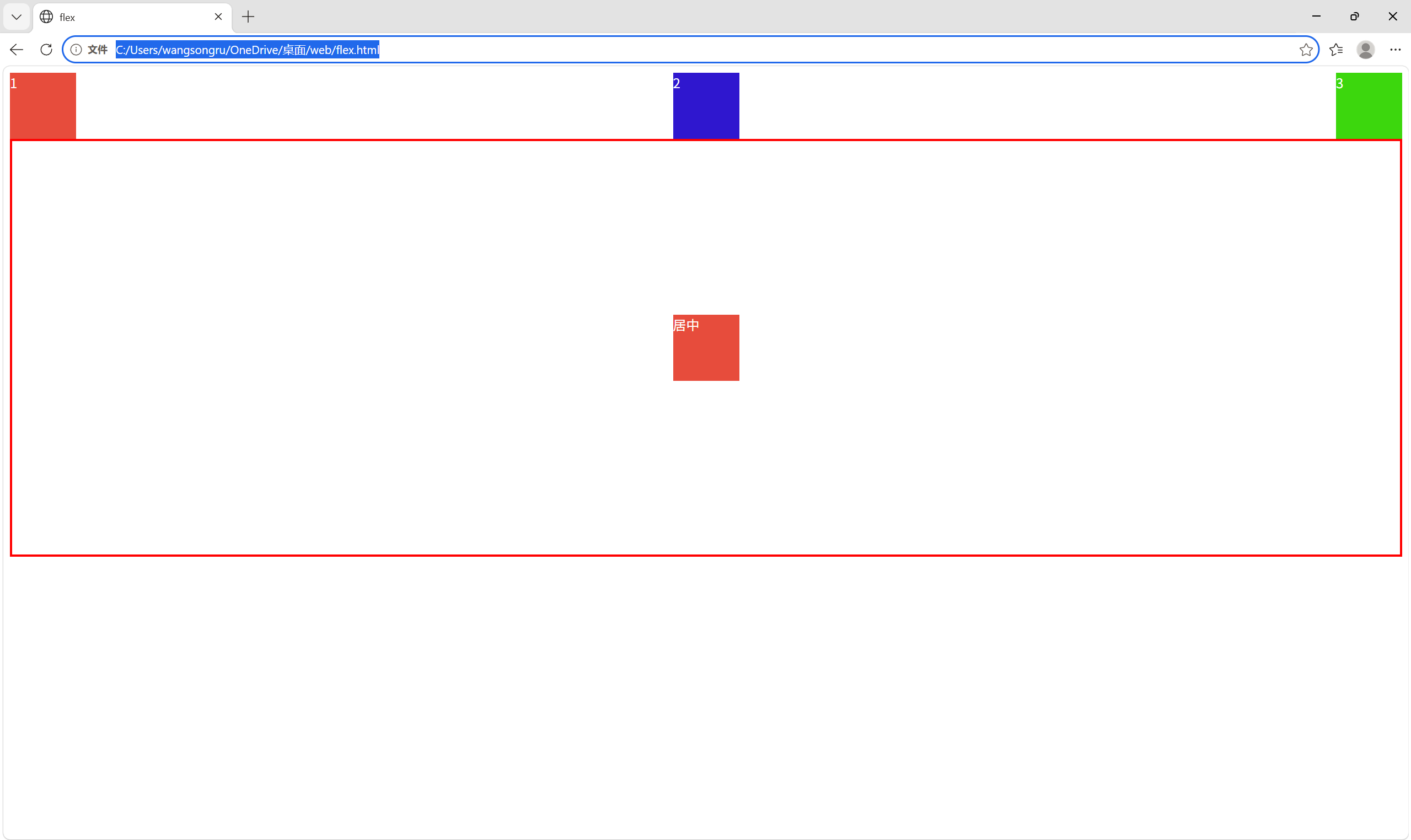
image.png
image.png

justify-content 和 align-items前者负责水平,后者负责垂直 ![image.png](/attachments/0511d9ef-3413-4f6b-a456-31e402cd5437) ![image.png](/attachments/df9ec8eb-ac66-4299-8b74-7f47d087bc8f)
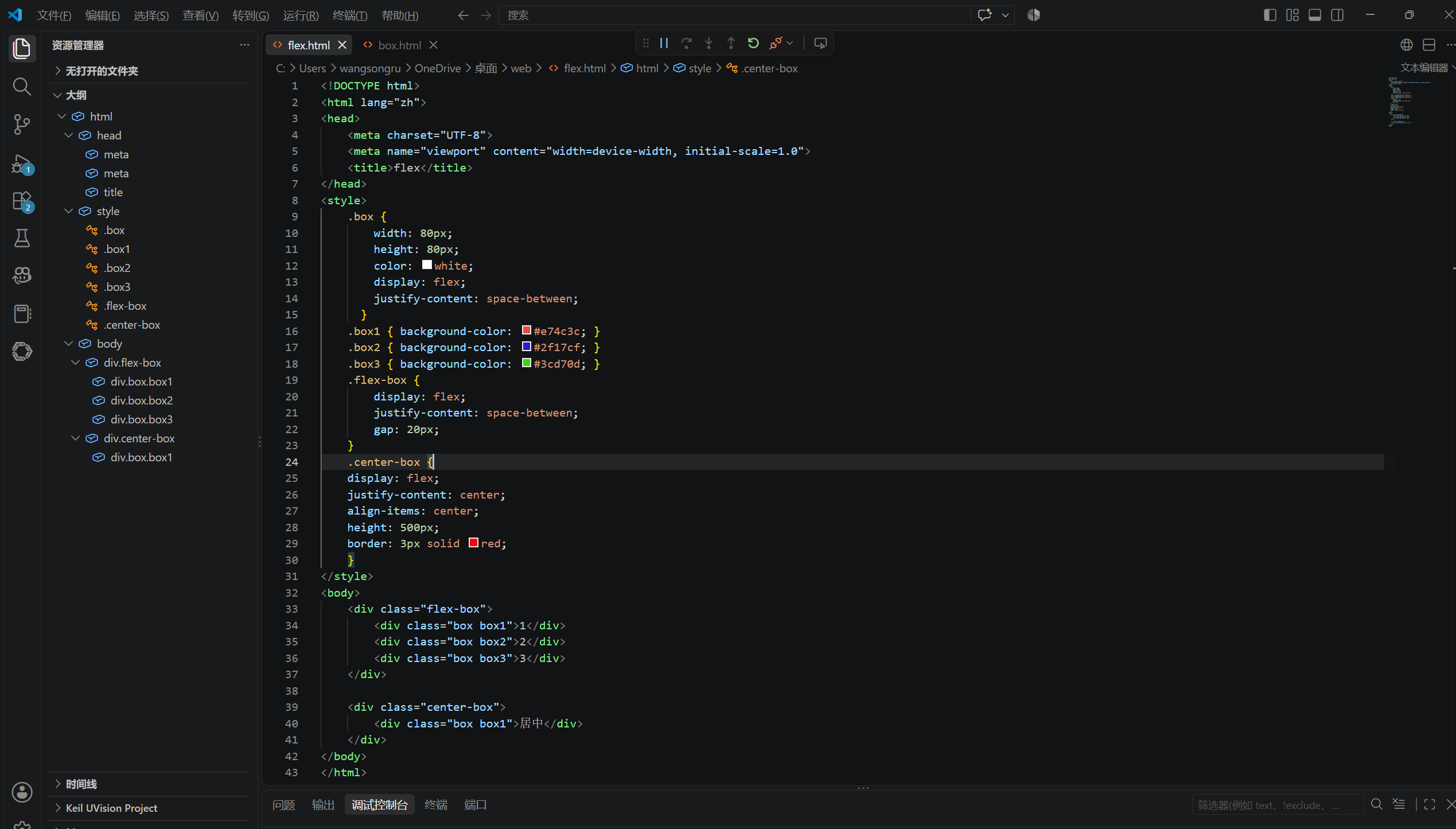
image.png

image.png

<!doctype html>

<html lang="en"> <head> </head> <style> .box { display: flex; justify-content: center; align-items: center; width: 400px; height: 300px; color: #fbf1d7; background-color: #73ae52; font-size: 240px; } .row { display: flex; justify-content: space-between; gap: 20px; background-color: blue; padding: 10px; } .center { display: flex; justify-content: center; gap: 20px; background-color: red; padding: 10px; } </style>
1
2
3
居中形态
</html>
![image.png](/attachments/5b7c669a-93e6-42fb-b892-f7e3e8f53693) ![image.png](/attachments/8d85d642-4f29-4c52-822a-f17b0ef2d080) <!doctype html> <html lang="en"> <head> <meta charset="UTF-8" /> <meta name="viewport" content="width=device-width, initial-scale=1.0" /> <title>flex学习</title> </head> <style> .box { display: flex; justify-content: center; align-items: center; width: 400px; height: 300px; color: #fbf1d7; background-color: #73ae52; font-size: 240px; } .row { display: flex; justify-content: space-between; gap: 20px; background-color: blue; padding: 10px; } .center { display: flex; justify-content: center; gap: 20px; background-color: red; padding: 10px; } </style> <body> <div class="row"> <div class="box">1</div> <div class="box">2</div> <div class="box">3</div> </div> <div class="center"> <div class="box" style="font-size: 50px">居中形态</div> </div> </body> </html>
131 KiB
279 KiB
Sign in to join this conversation.